1 / 3
Hello folks,
My original goal was simply to improve the cockpit from Milton Shupe's FSX Aero Commander into a modern MSFS 2024 cockpit, so I made some 3D gauges. When I tried to implement it, that plan quickly proved unrealistic, so I decided to start over from scratch: a whole new model! The project began with a simple placeholder model (blockout) generated with the help of Claude AI (Opus 5.5). From there, the aircraft was rebuilt step by step. Initially I planned to create a Model 500, but due to the limited availability of reliable documentation and the many small differences visible in historic photographs, development gradually focused on a configuration that most closely resembles an Aero Commander 520.
This aircraft has been created almost entirely from photographs, period references, and the FAA Type Certificate Data Sheet No. 6A1. As detailed information on the earliest Aero Commanders is surprisingly difficult to find for free, some details represent the best interpretation possible from available sources.
Features include: Native MSFS 2024 aircraft Custom Aero Commander exterior model Functional virtual cockpit Hidden "GPS" for optional navigation Dedicated FSEconomy warning light 🙂 Custom icing animations and effects Basic engine management simulation Passenger and cargo capability
While not intended as a perfectly documented museum recreation, the goal of this project is to bring one of the classic early post-war light twins into MSFS 2024 and provide an enjoyable aircraft for both vintage flying and FSEconomy operations.
IT IS WIP!
Enjoy your flights!
Download and unzip the file in community or community2024 folder
Yes. Aero Commander 520 can be downloaded free from Hangar Addons. It is released as Freeware – No Redistribution.
Aero Commander 520 is an addon in the General Aviation category for MSFS 2024.
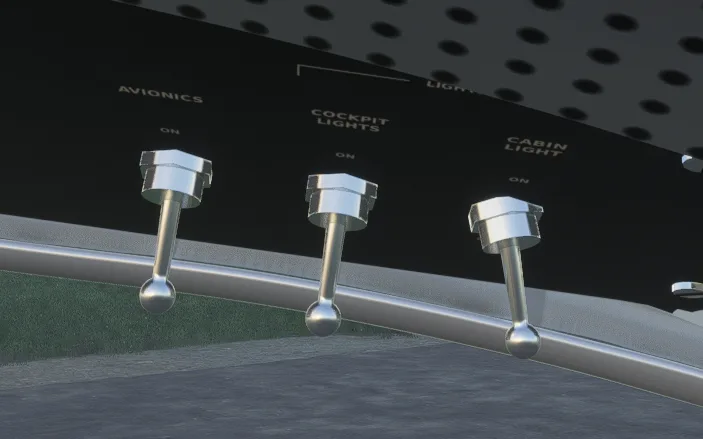
Looks really good for a freeware aircraft. A few recommendations. Firstly, I find that the default camera position is slightly too zoomed in and too high to see the instruments without moving the camera. Secondly, will there be english translated labels to stuff? I think it is in german (idk if that is just me). Lastly I noticed while looking around the cockpit, the switches for the beacon light and cabin light are slightly angled as seen in the screenshot attached. As I am not familiar with the aircraft, I can't say how accurate the sounds are currently, but they do sound good. It flies well. I look forward to seeing how this progresses!
The quickest way is the Hangar Addons Manager: select Add to Addon Manager on this page and it downloads and installs Aero Commander 520 in the right folder. You can also download the file (166 MB), unpack it and copy it into your MSFS 2024 addons folder. The installation guides on Hangar Addons show where that is.
Aero Commander 520 was made by muwaga.
The latest version is v0.1.3, last updated on November 7, 2026.
No community test results yet.
No other addons by this creator.

by EzMods · v0.3.2

by EzMods · v0.9.94

by Emerald Scenery Design · v1.0.1

by Canadian Captain Moustache · v2.02.13

by DrNoThumb · v1.1.1

by Ensi Ferrum · v1.10.0
