TechLog
TechLog
NaughtyPicklev2.1.2
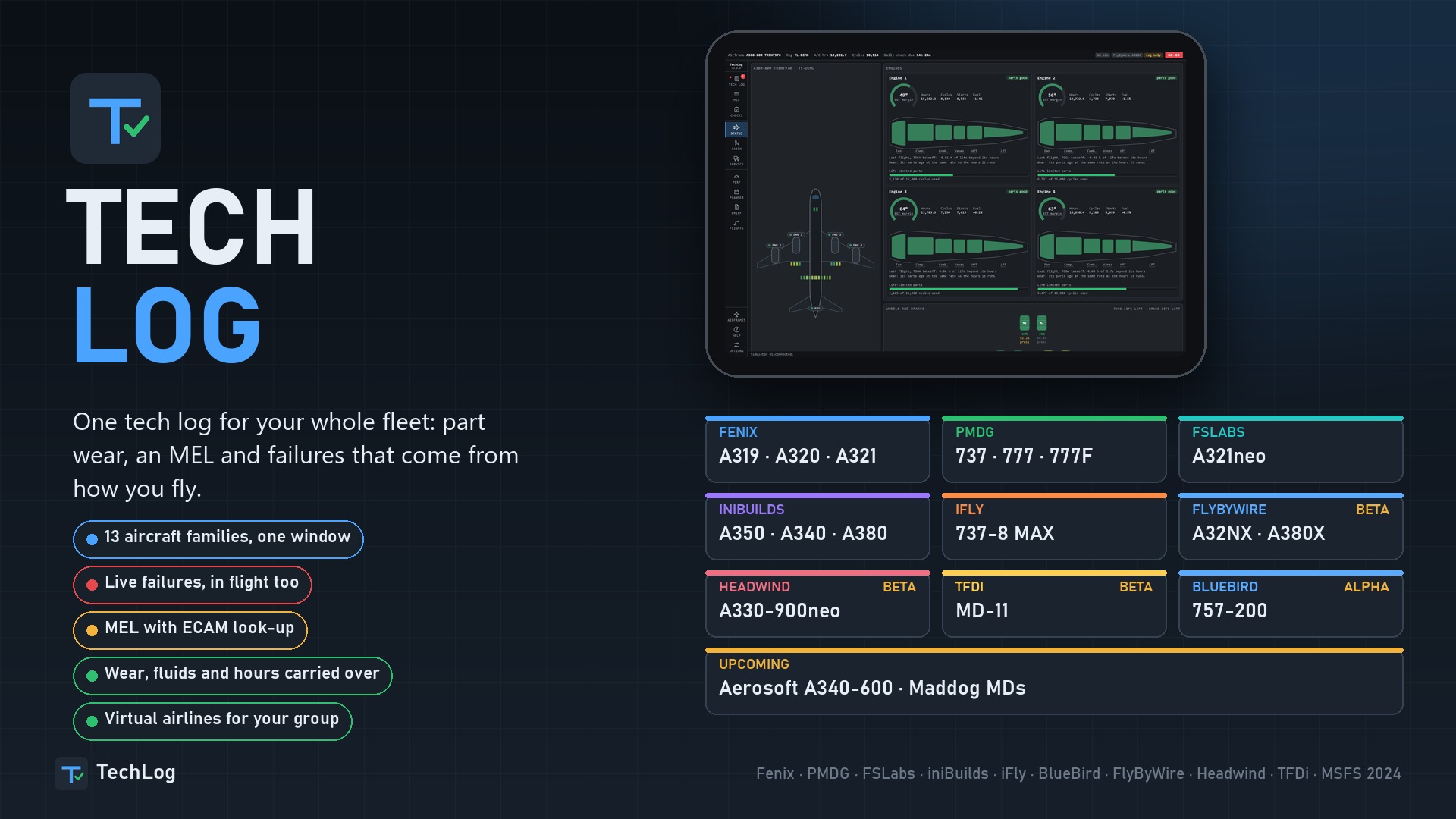
TechLog is a centralized maintenance and flight logging application compatible with multiple aircraft families from popular developers
Unpacked size 161 MB
One app for your whole fleet
TechLog is one window. Start it with the sim, or let the sim start it. Load an aircraft and TechLog sees which one it is and starts that aircraft's tech log. Load another and it saves, holds the flight and switches, on its own.
| Aircraft | Part Types | Mel Items | Failures it can set |
|---|---|---|---|
| Fenix A319, A320, A321 | 186 | 251 | 584 |
| PMDG 737 | 134 | 205 | 231 |
| PMDG 777, 777F | 133 | 206 | 356 |
| FSLabs A321neo | 209 | 290 | 333 |
| iniBuilds A350-900, A350-1000 | 163 | 233 | 74 |
| iniBuilds A340-300 | 174 | 239 | 43 |
| iniBuilds A380-800 | 174 | 239 | 43 |
| iFly 737-MAX8 (beta) | 134 | 205 | 118 |
| BB 757-200 (alpha) | 133 | 530 | NON |
| FlyByWire A32NX (beta) | 211 | 276 | 101 |
| FlyByWire A380X (beta) | 273 | 276 | 101 |
| Headwind A330-900neo (beta) | 273 | 276 | 101 |
| TFDi MD-11 (beta) | 273 | 276 | 101 |
Upcoming:Aerosoft A340-600
Nothing is lost
Close the sim and the airframe keeps its state, saved as it happens. Defects, fuel where the aircraft allows it, fluids, tyres, brakes, part lives, hours and cycles carry on.
Your fleet in one place
Every airframe of every aircraft, grouped by type. The same registration in two add-ons is two airframes, each with its own parts and history.
Failures with a cause
No random failures. Each part has its own life from the moment it is fitted, in its own unit: flight hours, engine hours, starts, cycles, reverser deployments or days. The same flights on the same airframe always end the same way.
Damage when it happens. Hard landings, overspeeds, flap and gear limits, tail strikes, pod strikes, hot brakes, tyre speed, overweight landings, takeoff thrust held too long. Each leaves its item in the tech log, and the worse ones go into the aircraft straight away.
Engines wear by how hard they work. Idle costs little, climb more, takeoff thrust several times as much, and a reduced takeoff less than full thrust. Each engine has its own fan, compressor, combustor and turbines, and its own EGT margin.
Tech log and MEL
The tech log tells you one thing first: may this aircraft go? Below that is every open and deferred item, with its category, placard, restriction and the date it runs out.
Each item says whether the aircraft may go, under which conditions, what the crew does in each phase of flight, what the engineers do, how long it takes and which placard goes on. Type the alert as the ECAM shows it and you get the item.
The A350 and A340 use real item numbers and, where published, real repair categories and installed and required counts. No-dispatch items are no-dispatch: PRIM 3 on the A350, PRIM 2 and SEC 2 on the A340. All text is TechLog's own, for simulation use.
Service and checks
Everything on the ground in one place. Oil, hydraulics, oxygen, water, waste, catering and cabin cleaning, with the least for dispatch marked. Fix a part for some of its life back, less each time, or replace it with a new one.
Every aircraft's gear is drawn as it is built, for Service and for Status.
A worn aircraft burns more. Engine wear and airframe age add up to a fuel factor, ready for SimBrief and the FMS. An engine wash gives some EGT margin back.
Planner
One page answers READY, CAUTION or NOT READY for the next flight, gives the reason for each, then lists what comes due by date, hours or cycles. Book work ahead and it is done at its time. Turn on company use and the airline flies your aircraft while you are away, but never one that is in the hangar.
Cabin
The whole cabin, seat by seat, with galleys, lavatories and fittings, each with its own wear. Tap a seat to see it. Cabin systems show doors, slides, water and waste as the aircraft reports them, on the aircraft that give them.
Cockpit profiles
Save a cockpit under a name of your own: Cold and dark, Ready for pushback, Parked overnight. Put it back whenever you want, or automatically on a cold and dark load. TechLog never writes brightness or EFB settings.
Performance
Takeoff and landing figures with your defects taken into account, by each aircraft's own calculator where it has one. Fenix, PMDG and FSLabs each have their own page in their own words: FLEX or ASSUMED, CONF or FLAPS, MCDU or FMC. On the iniBuilds A350 and A340 it opens from the TechLog button in the aircraft's own EFB, on the aircraft's own tables. ** Flight log**
Every flight, recorded by itself. A score, touchdown rate and point on the runway, approach stability, a timeline of events, a drawn profile and what the flight did to the aircraft, part by part. Stable approaches are judged at the same heights a crew uses.
History keeps every fault the airframe has had, by system, and what was done about it.
What each aircraft gets
Fenix A319, A320, A321. Failures set live, in flight too. Worn engines really push less. Fuel from the last shutdown put back, engine oil read from the aircraft, cabin systems, takeoff and landing from Fenix's own calculators, Send to MCDU, and a TechLog button in Fenix's EFB.
PMDG 737. Failures set through the FMC's own pages using the PMDG SDK, which the setup offers to turn on. No CDU work below 1,000 ft in flight. Oil, vibration and hydraulic readings, its own cockpit profiles, Performance with Send to FMC.
PMDG 777 and 777F. Its own parts, MEL and limits, GE90 engines, twelve main wheels. The PMDG Performance pages need the sim's Developer Mode.
FSLabs A321neo. Linked to its EFB: defects on its tablet, INOP stickers in the cockpit, a TechLog tile, its calculators, cockpit profiles and readings.
iniBuilds A350-900 and A350-1000. Failures sent straight to the aircraft, with no mouse and no window. TechLog is the master of brake and tyre wear, oil, hydraulics, batteries and APU figures, and keeps them in step with the aircraft's own maintenance page. A TechLog button in its EFB with Performance and Send to FMS. Cockpit profiles, cabin systems, GPS jamming as a setting.
iniBuilds A340-300. All of that with four engines, engine failures and fuel kept from the last shutdown. An optional TechLog icon on its EFB changes one file of the add-on, with a copy kept, and is off by default.
iniBuilds A380-800 (beta). Four engines, 22 wheels, failures through its own failure switches with no mouse, water, waste and fluids taken from the aircraft, engine oil kept by TechLog, and Performance from its own take-off calculation and landing table. Performance and the optional TechLog icon on its EFB need the sim's Developer Mode; neither changes a file of the add-on.
iFly 737-8 MAX (beta). Failures through the iFly's own EFB program, checked in its own state; failures you set on its tablet go into the tech log. Performance from its own calculator, cockpit per airframe through its own panel files, and an optional TechLog tab on its tablet. Its EGT, fuel flow and vibration are not given out, so those are not judged.
BlueBird 757-200 (alpha). Tech log, part wear, 530 MEL items with the real MMEL numbers, cockpit profiles, readings and chocks. No failure is set in the aircraft yet: its failures can only be set from its own EFB. An experimental switch in Settings sets its fire detector loop faults.
Settings and help
Wear rate, units, accessibility, maintenance times, and a panel for each aircraft. A guide inside the app is written for the aircraft you have loaded.
Kinder to the sim
TechLog's MEL is its own wording, for simulation use only.
Discord: discord.gg: 8UVBZ7VnpU
No ratings yet.
Be the first to rate this.
Fixes the virtual airline error "Your TechLog's catalogue is not the one this airline flies with. Update TechLog.
Yes. TechLog can be downloaded free from Hangar Addons. It is released as Freeware.
TechLog is an addon in the Realism Mods category for MSFS 2024.
The quickest way is the Hangar Addons Manager: select Add to Addon Manager on this page and it downloads and installs TechLog in the right folder. You can also download the file (156 MB), unpack it and copy it into your MSFS 2024 addons folder. The installation guides on Hangar Addons show where that is.
TechLog was made by NaughtyPickle.
The latest version is v2.1.2, last updated on November 18, 2026.
1 addon, member since 2026
